Release Notes
April 2020
What's New
In our April release, we’re introducing an option that allows co-management of a macOS device using the KACE Systems Management Appliance (SMA) agent and KACE Cloud Mobile Device Manager. The deployment of an SMA agent enables functions such as running scripts, security scans, and patching when provisioned by an SMA.
In addition, we’ve added functional enhancements that include setting up an identity provider protocol using SAML and Google G-Suite; an important workflow update for DEP; iOS/macOS version updating, and updated instructions for forcing token authentication when setting up a DEP profile on a macOS device.
We’d also like to invite our KACE Cloud MDM subscribers to participate in our closed beta of Samsung Knox. The only criteria is that customers have Samsung devices that are available for enrollment through the Samsung Knox program. To get set up with the Samsung Knox beta in KACE Cloud MDM, please contact support.
Installing the SMA Agent for macOS
In order to better support deployment of the SMA agent to macOS devices, KACE Cloud MDM now supports installing apps that are background services. These app packages can be marked as such after they are uploaded to the app library.
Learn more about
SSO with Google G-Suite
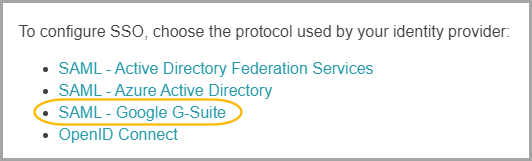
In addition to setting up an identity provider protocol using SAML with ADFS and Azure AD, admins can now use SAML with Google G-Suite.
DEP Workflow Update
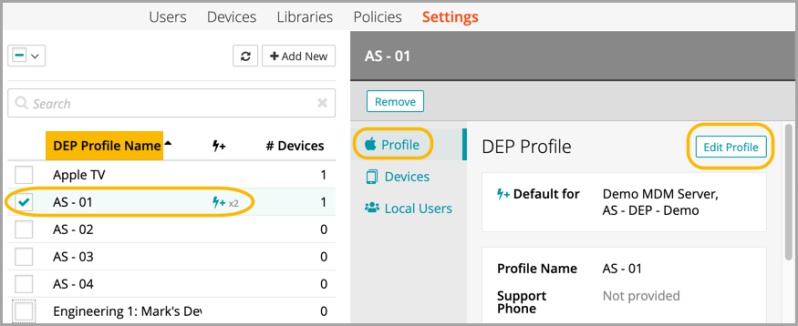
Before this update, customers who saved changes to DEP profiles with devices assigned found that the changes weren’t getting pushed to the devices.
Admin Action Item - To correct this issue and update your devices, open any DEP profile with devices assigned, choose Edit, then click Save. No changes are required in edit mode. This action will force any missing changes to be pushed to the devices.
iOS and macOS Version Updating
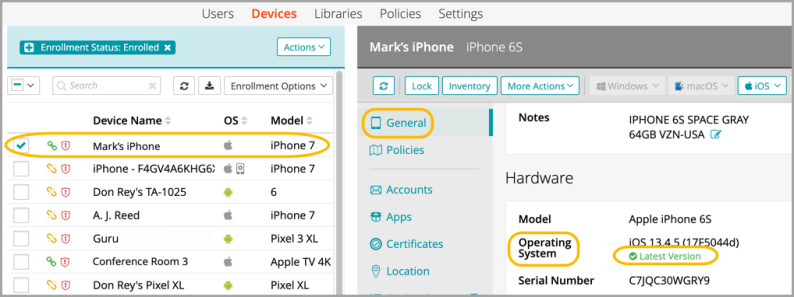
When updating the OS version of any device, our UI now monitors progress once the update version command is submitted. The status progresses from Update Available to Downloading or Waiting, then to Installing, and finally to Latest Version.
If the OS update doesn’t finish within 2 hours of being initiated, the status will revert back to Update Available. The update can be re-initiated to restart the monitoring process.
Force Token Authentication
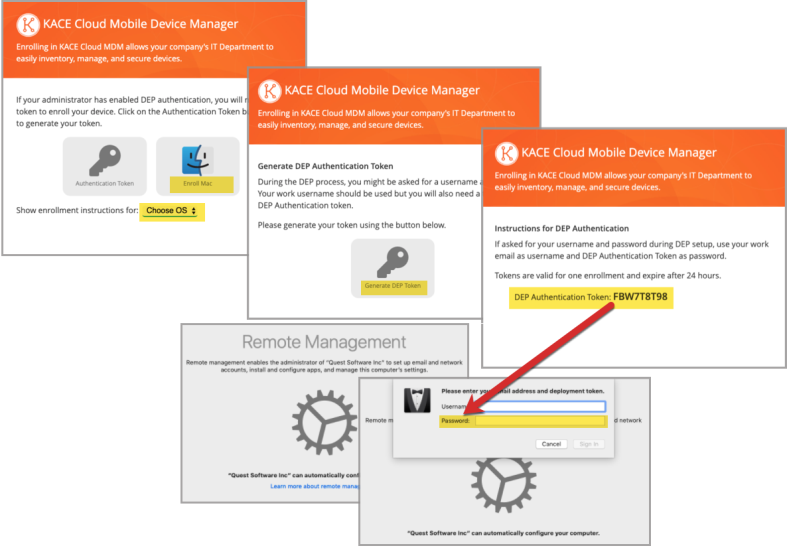
When setting up a macOS device with a DEP Profile, there is an option to enable ‘Force token authentication’. Selecting this checkbox will ensure that a token can be quickly generated for use as a password during remote management set-up.
The workflow below illustrates the location of token generation and at which stage of enrollment this token is required as a password.
Learn more about Forced Token Authentication.
Resolved Issues
Bug fixes are included in the resolved issues list for two release periods and are then retired.
| Issue | Description | Status |
| ESMCL- 4031 App list when importing to device does not show app configs | The list of apps available for adding includes one item for every App + App Config combination. | FIXED |
| ESMCL- 4023 Apple DEP Authentication Text Not Displaying | DEP authentication is still working; updated display message. | FIXED |
| ESMCL- 4016 DEP Profile updated; not updating devices | Post 4/27/20: When editing any DEP Profile, all saved changes will be pushed to associated devices. Pre-4/27/20 Admin Action Item: Open each DEP Profile > Open Edit > click Save. | FIXED |
| ESMCL- 3852 Clearing search filter on users page does not update results | The user list updates to show all users and not just the ones that match the search. | FIXED |
| ESMCL- 3775 Admin Portal: Row selection state - unintended row stays selected | Internal selection state now matches selection in device table. Previously selected rows will not stay selected. | FIXED |
| ESMCL- 3697 VPP URL issue on apple side | KACE Cloud now actively pulls URLs from VPP/Apple back-end, so if Apple changes again, KACE Cloud users won't be affected. | FIXED |
| ESMCL-3630 Android Enrollment Timeout | Android enrollment could time out if the subscription contained complex policies or smart labels. | FIXED |
| ESMCL- 3598Checking “Allow access only to specified bookmarked URLs” restriction. | When editing an iOS restriction set in the library, checking the restriction “Allow access only to specified bookmarked URLs” would cause JavaScript errors. | FIXED |
| ESMCL- 3507 Device History does not show the installation of Android Options | Device History screen shows the installation of the android options configuration | FIXED |
Known Issues
Additional Resources
© 2020 Quest Software Inc.
ALL RIGHTS RESERVED.
This guide contains proprietary information protected by copyright. The software described in this guide is furnished under a software license or nondisclosure agreement. This software may be used or copied only in accordance with the terms of the applicable agreement. No part of this guide may be reproduced or transmitted in any form or by any means, electronic or mechanical, including photocopying and recording for any purpose other than the purchaser’s personal use without the written permission of Quest Software Inc.
The information in this document is provided in connection with Quest Software products. No license, express or implied, by estoppel or otherwise, to any intellectual property right is granted by this document or in connection with the sale of Quest Software products. EXCEPT AS SET FORTH IN THE TERMS AND CONDITIONS AS SPECIFIED IN THE LICENSE AGREEMENT FOR THIS PRODUCT, QUEST SOFTWARE ASSUMES NO LIABILITY WHATSOEVER AND DISCLAIMS ANY EXPRESS, IMPLIED OR STATUTORY WARRANTY RELATING TO ITS PRODUCTS INCLUDING, BUT NOT LIMITED TO, THE IMPLIED WARRANTY OF MERCHANTABILITY, FITNESS FOR A PARTICULAR PURPOSE, OR NON-INFRINGEMENT. IN NO EVENT SHALL QUEST SOFTWARE BE LIABLE FOR ANY DIRECT, INDIRECT, CONSEQUENTIAL, PUNITIVE, SPECIAL OR INCIDENTAL DAMAGES (INCLUDING, WITHOUT LIMITATION, DAMAGES FOR LOSS OF PROFITS, BUSINESS INTERRUPTION OR LOSS OF INFORMATION) ARISING OUT OF THE USE OR INABILITY TO USE THIS DOCUMENT, EVEN IF QUEST SOFTWARE HAS BEEN ADVISED OF THE POSSIBILITY OF SUCH DAMAGES. Quest Software makes no representations or warranties with respect to the accuracy or completeness of the contents of this document and reserves the right to make changes to specifications and product descriptions at any time without notice. Quest Software does not make any commitment to update the information contained in this document.
If you have any questions regarding your potential use of this material, contact:
Quest Software Inc.
Attn: LEGAL Dept.
4 Polaris Way
Aliso Viejo, CA 92656
Refer to our website (www.quest.com) for regional and international office information.
Patents
Quest Software is proud of our advanced technology. Patents and pending patents may apply to this product. For the most current information about applicable patents for this product, please visit our website at www.quest.com/legal.
Trademarks
Quest and the Quest logo are trademarks and registered trademarks of Quest Software Inc. in the U.S.A. and other countries. For a complete list of Quest Software trademarks, please visit our website at www.quest.com/legal. All other trademarks, servicemarks, registered trademarks, and registered servicemarks are the property of their respective owners.